SpreadFighter alerts → Pionex Signal Bot: setup
A SpreadFighter alert can open and close Pionex bot trades by itself. When a condition fires (price, OI, funding, liquidation spike, order book spoofing, etc.), SpreadFighter sends a signal to your Signal Bot, and the bot executes the trade.
The webhook places real trades with your money. Start with the minimum bot amount and 1x leverage, and test the setup on a single alert before trusting it with a larger amount.
What you need
- a Pionex account: sign up
- at least 50 USDT in your Pionex futures account - this is the minimum amount for a Signal Bot
- a SpreadFighter account
Step 1. Create a signal on Pionex
Futures → FuturesBot tab → Signal Bot → Create. Pionex will offer to create your own TradingView signal. Create it and give it a clear name.
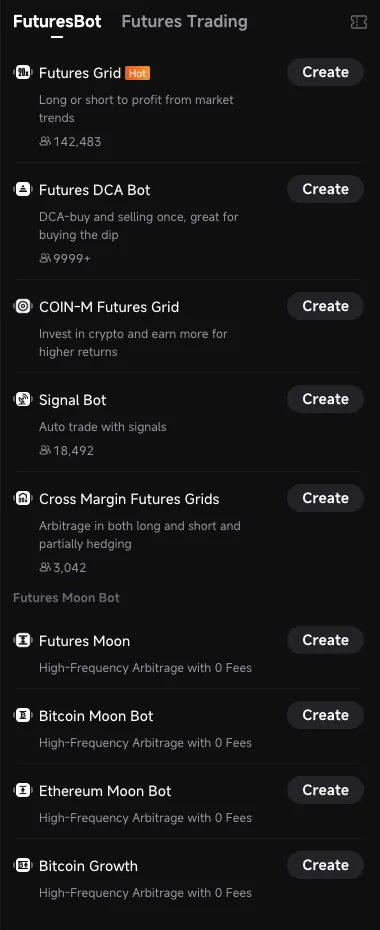
Signal Bot in the Pionex bot list
Step 2. Copy the webhook URL and the signal ID
On the signal page:
- In the "1. Script Configuration" block, check I have completed the configuration. You do not need to set up a script in TradingView. SpreadFighter will send the signal.
- Expand "2. Create Alerts" and copy the Webhook URL.
- Copy the signal ID. This is the
signal_typevalue in the Message block. It is also the same as the identifier in the page addresspionex.com/en/user-signal/<ID>.
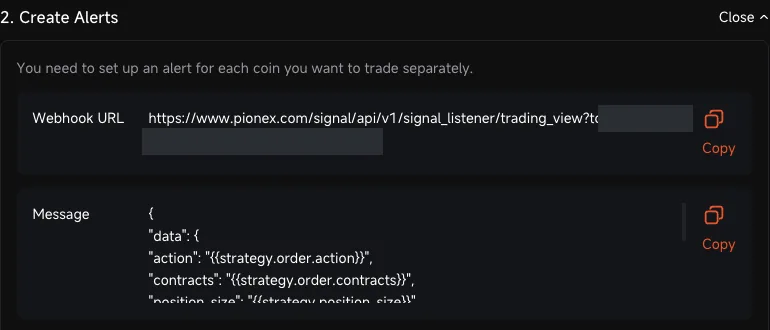
Webhook URL and message template (token hidden)
The webhook URL contains a token. Anyone who knows it can send signals to your bot. Do not publish it or show it in screenshots. If the token leaks, recreate the signal.
Step 3. Start a bot on this signal
On the signal page, click Automate signal:
- pair - the pair the bot will trade, for example BTC/USDT. One bot trades one pair
- Investment - from 50 USDT
- leverage - 1x to start with (Signal Bot supports up to 10x)
Create the bot. The bot will appear in Orders → Trading Bot Orders and wait for signals.

Creating a bot: pair, amount, leverage
Step 4. Connect the alert in SpreadFighter
Open Alerts → create a new alert or edit an existing one (a liquidation alert works too) → Notifications tab → turn on Webhook (Pionex Signal Bot or custom URL):
| Field | What to enter |
|---|---|
| Destination | Pionex Signal Bot |
| Webhook URL | Webhook URL from step 2 |
| Signal ID | signal_type from step 2 |
| Bot pair | the pair from step 3 in the BTCUSDT format |
| Action | Open long / Close long / Open short / Close short |
| Share of bot, % | what part of the bot amount to use, usually 100 |
Save the alert. When the condition fires, SpreadFighter sends the signal and calculates the size itself from the current price.
How it works
- Bot pair. The signal always goes out with the bot pair, whichever symbol the alert fired on. For example, you can close the bot's BTC position on an alert about a liquidation cascade across the whole market.
- Share of bot. 100% is the whole bot amount including leverage. With 50 USDT and 1x, that is a position of about 50 USDT (Pionex rounds the size down to the lot step).
- Target position. The signal tells the bot what the position should become: "Open long" → a long of the given share, "Close long" → no position. So "Close long" does not close a short if a short is open. Each side has its own action.
- One alert, one action. A full strategy needs two alerts: one opens the position and the other closes it (for example, a long on a spike in short liquidations and a close on an OI reversal).
- Repeats. If the alert has a cooldown enabled, each repeated trigger after it sends the signal again.
How to check that everything works
Signal Log on the signal page shows all incoming signals and how Pionex understood them: "Long BTC", "Close BTC long", "Short BTC", "Close BTC short".
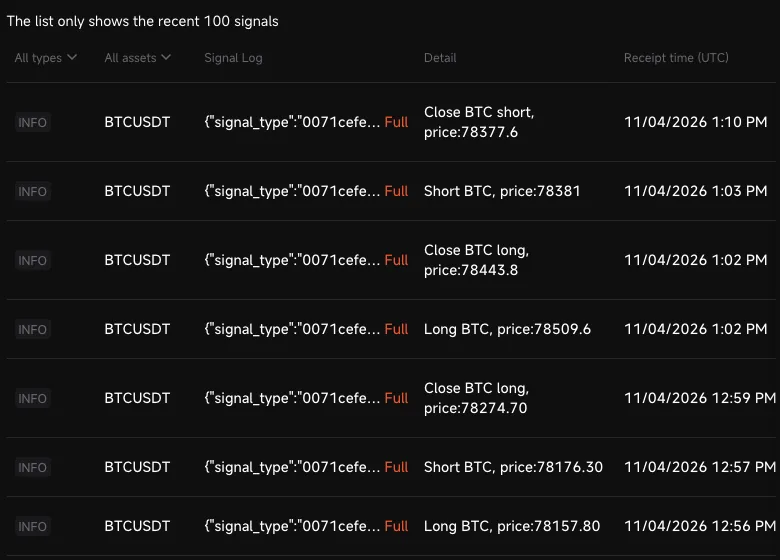
Signal Log: signals from SpreadFighter
Orders → Trading Bot Orders shows the bot's current position, trades and PnL.
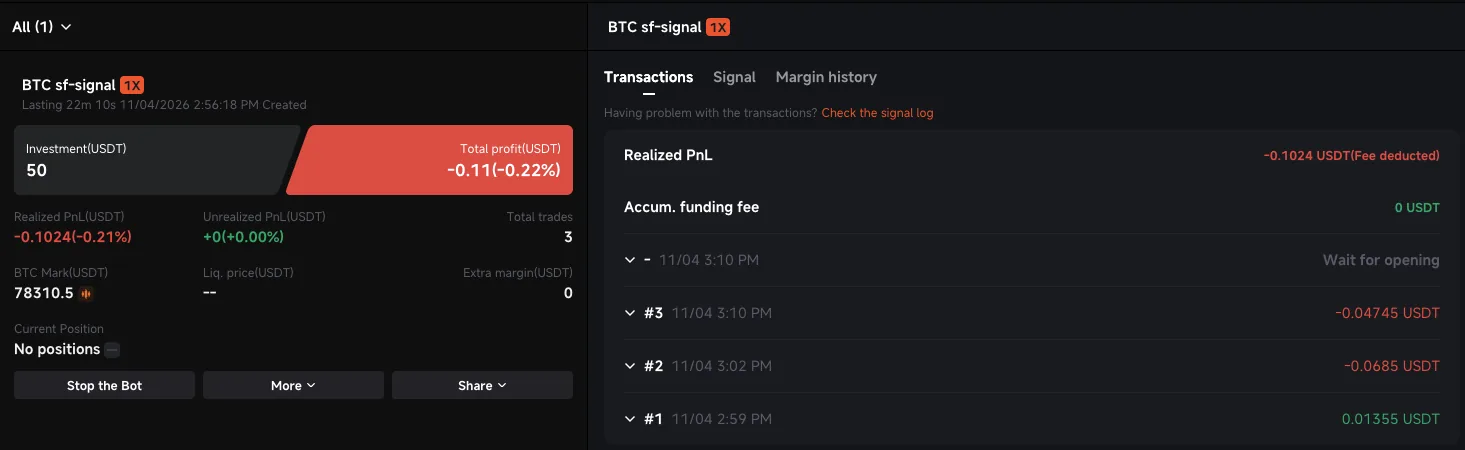
Bot after a test: opening and closing a long and a short
If the trade did not open
| What you see | Cause and what to do |
|---|---|
| No signal in Signal Log | Wrong webhook URL or token (Pionex replies 401). Copy the Webhook URL again. Check that the alert is active and the condition really fired |
| The signal is there, but no trade | The bot is not created or is stopped, or the bot pair in the alert does not match the bot pair on Pionex |
| Signal ID error | Wrong signal_type (Pionex replies 400). Copy the ID from the signal page |
| WARNING "Long … with N% fund" | Not an error: the entry is not for the whole bot amount. Check the "Share of bot" field |
| "Short BTC" instead of closing the long | The alert has "Open short" selected, but you need "Close long" |
How SpreadFighter helps you set up Pionex bots
- liquidation heatmap - where price can be shot through; it is better not to put grid boundaries right inside a cluster
- footprint and Value Area - where price spends time. But take a wider grid range: in our backtest on 30 coins over a year, a grid as wide as the Value Area went out of bounds in half of cases within a single day. A grid no narrower than the daily range (max−min over 24 h) works noticeably better. Also remember: a grid often gives a small profit, but a rare exit of price from the range eats a lot. Analysis in backtests
- spoofing detector - if walls are being drawn in the order book, the coin deserves a closer look before you set up a bot
- funding across exchanges - shows where the market is skewed to one side
- grid helper - boundaries and number of grids based on the daily range; a grid with these values can be launched on Pionex right from the chart, see Pionex: grids from SpreadFighter